Home > Sync > Blog > Tech Trends > Home Entertainment > Bell launches external USB hard drive expansion option on ExpressVu 9242 PVR
TT August 7, 2008 at 5:32 pm

Bell launches external USB hard drive expansion option on ExpressVu 9242 PVR

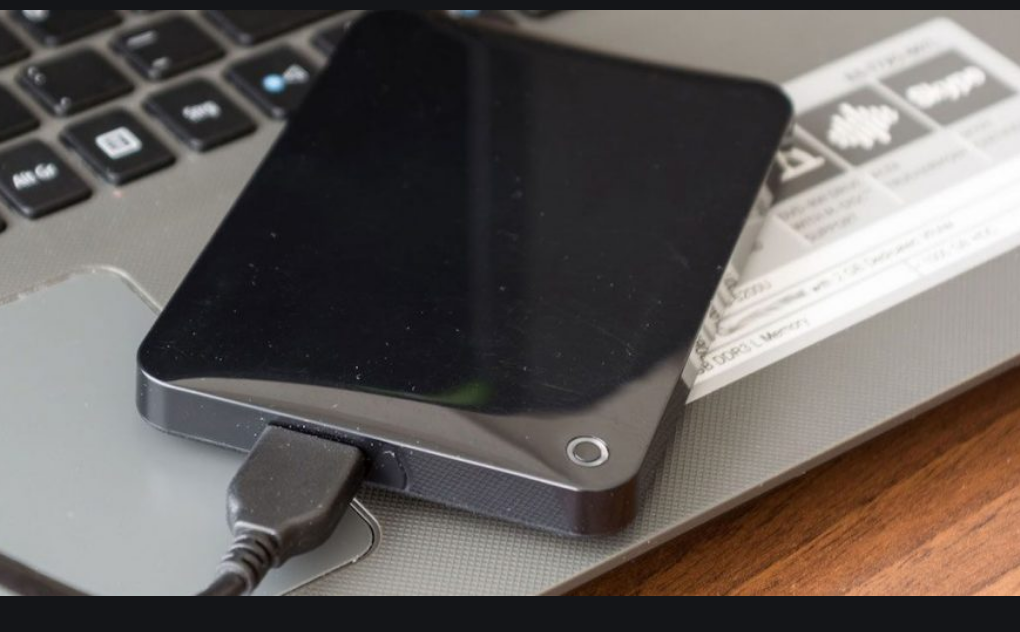
After midnight tonight, owners of Bell TV’s (formerly Bell ExpressVu) 9242 HD/PVR will be able to connect external USB hard drives giving them virtually unlimited recording space for their favourite movies and TV shows.


External_drive After midnight tonight, owners of Bell TV’s (formerly Bell ExpressVu) 9242 HD/PVR will be able to connect external USB hard drives giving them virtually unlimited recording space for their favourite movies and TV shows.

This new option which will be released as a free, automatic software update to 9242 model satellite receivers, marks the first time a Canadian TV provider has officially supported the use of external storage to enhance the capacity of a PVR.

To take advantage of this new functionality, 9242 owners need simply buy a compatible external hard drive. The minimum specs are:

• USB 2.0 connectivity
• 7200 RPM disk speed
• External power adapter
• Always-on (no-sleep mode)

While there is no minimum disk size, not every external drive that meets the above specs is guaranteed to work with the 9242. Bell is selling a Lacie 750 GB external drive for $199 via their website (and soon in Bell World stores) which they guarantee will be compatible.

There are a few caveats with this announcement:

• Flash-based USB 2.0 drives are not supported
• Content cannot be recorded directly to the external hard drive, instead you use it as an archive volume for freeing up space on the 9242’s built-in HD
• Once connected, the 9242 will format the drive if it has never been used with the PVR before. This formatting is not compatible with PCs.
• If the hard drive is subsequently connected to a PC, the built-in software will instruct the PC to automatically reformat the drive

Playing back programs that have been transferred to the external hard drive is simple and can be done via the 9242’s on-screen PVR interface. The external hard drive appears as a ‘group’ in the PVR list labelled "External Hard Drive".

9242exthdxfer

There is no limit to how many external drives can be used with the 9242, so theoretically, your recording capacity is unlimited and the cost for expanding capacity is determined by which external hard drive you choose, giving you much greater flexibility than with the built-in disk in the receiver.
There are no specs available on how fast program transfers take, however the software allows you watch TV while the transfer is in progress, instead of simply having to stare at the progress bar.

It had been rumoured that this software update was going to be applied to Bell’s 6141 receivers as well, which are PVR-ready, but lack an internal hard drive. Unfortunately this is not the case. But, I have good news for 6141 owners: your time is coming. I have it on good authority that the software needed to connect an external HD to these receivers will be released before the end of the year.

Now some of you may remember that back around the time of the CES show in January, a certain Bell VP promised to support recording from a Bell PVR to an Archos portable media player. It seems that this project is – for the time being at least – on hold. The VP is no longer with the company and it remains to be seen if anyone within the Bell TV division has the necessary enthusiasm for the project to get it back on track.

Update, August 8: Despite the fact that the older, 9200 HD/PVR is equipped with USB ports, the external hard drive feature is not going to be enabled with this software release, and none is planned for the future. On a bright note however, Bell TV seems to have quietly added a cool new feature for the 9200: Photo Viewing. Load up a USB flash drive with .JPG files and plug it into the 9200’s USB port. Or use a USB cable and plug in your digital camera directly. Doing so activates the USB host feature on the 9200 in much the same way it does on your PC. Once your drive or camera is plugged in, you can browse and edit your photos and watch them as a slideshow. Apparently this unpublicized feature has been enabled for a while now. Who knew?


Filed Under: Home Entertainment > News > Television


Comments (60)

  • JANE BENDA-MUXLOW says:

    FANTASTIC-I HOPE IT WILL WORK!!!!!!!!!!!!!!!!!!!

    (Report comment)

  • USB to archive makes it convenient to transfer to archive in internet. I'm wondering when internet based television stream or something equivalent is coming to bell sympatico instead of sometimes banned satellite linkups to protect cable?

    (Report comment)

  • 7SeVeN7 says:

    this sounds great ,to be able save your fave programs to watch later,BUT isnt this condoning piracy??? After all you would have to do is take an extra 5minutes after you download, to upload to your fave site.

    (Report comment)

  • Simon Cohen says:

    @ 7SeVeN7: It's going to be pretty hard to upload the recorded shows given the formatting issue I described in the article.

    (Report comment)

  • 7SeVeN7 says:

    @simon quote"Content cannot be recorded directly to the external hard drive, instead you use it as an archive volume for freeing up space on the 9242's built-in HD" if the archive is done in .part type file and stored on the external HD the .avi can be extracted,now with the "formatting of the EX. HD what does this format it too? just to a blank HD with no OS what so ever?… can you elaborate on this?

    (Report comment)

  • Simon Cohen says:

    If you connect the external HD to a PC *after* it has been used to record shows using the PVR, the PC will automatically format the HD, wiping the contents and leaving it as an empty volume. That said, the shows are recorded as DRM media files, so even assuming you could get them off the HD onto a PC, they would be difficult to playback.

    (Report comment)

  • A Navales says:

    Do you think Rogers will do the same with their PVRs? I know this is a Bell sponsored website but it is only fair that we get both sides of the coin. I there also a way to swap the harddrives on the machines (just like on the PS3)?

    (Report comment)

  • Simon Cohen says:

    I think it's safe to assume that now that Bell has introduced this feature, their competitors won't stay behind for long. And, no, internal HDs are not swappable on any PVR unit that I'm aware of. Unless you don't mind voiding the warranty ;)

    (Report comment)

  • Terry says:

    Any idea whether this will work on the original 9200 PVR?

    (Report comment)

  • I wrote a mini-review:

    http://www.mcgrath.ca/2008/08/08/mini-review-expressvu-external-hard-drive-9242-hd-pvr/

    But I did plug it to my computer thus explained why it formated later on. I already knew it was not readable. Btw, I tested with 2 9242 HD PVR and an old 200GB drive.

    (Report comment)

  • manny says:

    wont be long before an emulator will be designed by a hacker ,so we can also watch stored movies on the pc

    (Report comment)

  • Just Conc says:

    So, the harddrive will be formatted when plugged in to the USB? But not the USB drive or your camera for photoviewing? Hmmmm interesting.

    (Report comment)

  • Gary R Arrowsmith says:

    Why cant BELL give us an USB SATA Drive.
    I dont want to spends hours copying movies to my hard drive. I want quick and simple file transfers.
    WHY CANT MOTHERBOARD MANUFACTURERS put a EXTERNAL SATA CONNECT on thier motherboards? It is plain to see they are milking us for our money and selling us yesterdays technology with a fancy idea. Come on! Please start selling us todays technology! I dont want to buy something of yesterdays technology for todays prices just because you put a fancy wrapper on it. NOT FAIR!

    I hate it when Corporations milk the very same people that work for them out of thier money. Your $16 dollars and hour is really only about $4 dollars after they all get finished milking you for your hard earned dollars when you consume products.

    Come on!!! DONT RIP ME OFF EVERY DAY ON EVERYTHING!
    BELL CANADA originated in my city and i am embarassed they are not trying to utilize todays technology especially when it comes to hard drives. I WANT TO BE ABLE TO USE THAT HARD DRIVE IN MY COMPUTER MAYBE SOME DAY IF THE ONE I HAVE QUITS ON ME! I CANT USE AN OLD TECHNOLOGY IDE DRIVE!

    (Report comment)

  • Gary, look at this the other way:

    Many have older hard drives laying around. It could hold less hours than a brand new drive that I'm sure they would use in their computer anyway and not the PVR.

    I agree that the next model should have both.

    For the 9242, the model was released last year on Bev and add 1+ year of developments(Dishnet) before that with the common and trusted technology of that time.

    They could had used firewire but how many have an external case for that. It's a minority since most have USB.

    Bev drop the ball last year with a lower sized hard drive vs Dish. But, by giving the upgrade for free unlike Dish, they make up for that.

    Someone else mentioned that you can only moved the drive so many times between receivers(format after). I sure would like a confirmation on that.

    (Report comment)

  • Simon Cohen says:

    @ Gary:
    If you want to use a SATA drive, there's nothing stopping you. Just pick up a USB SATA drive enclosure (found some here http://www.usbgear.com/USB-SATA.html) and then you can use any SATA drive you like. I didn't see anything in Bell TV's specs prohibiting a SATA drive as long as it meets the other min. specs. Suggest you call Bell TV tech support to confirm before you spend $$.

    (Report comment)

  • Simon: Gary was talking about a true eSATA connection thus the speed of an internal drive.

    (Report comment)

  • manny says:

    if plugging a full external drive back to a pc causes a reformat, is it still possible to save data using a undelete program then use a media player that plays there format?

    (Report comment)

  • No since you can't see the files in the first place.

    (Report comment)

  • Simon Cohen says:

    @ Steve: Yes, I know Gary was looking for eSATA, but if his primary concern is being able to use a SATA drive for the 9242 expansion so that he can then use the same drive later internally in a PC, a USB-SATA enclosure is the way to go. I do agree that an eSATA port would have been a welcome addition, but as you say – so few even use this standard it would likely be wasted. Also, given that transfering files doesn't lock up the receiver from other tasks, it's tough to argue that faster transfer speeds should be a req.

    (Report comment)

  • Simon: I only did 3 archiving during my test and the one time I watch TV during the archiving process, it crashed on me. It was only a 17 minutes HD recording and it could had been a bad luck. Reading other forums, I'm not alone and I hope it's only a small percentage.

    (Report comment)

    • buges says:

      hi, i need some help her.
      i plugged a hard drive to my hd reciver and now my computer does not recognizes the hard drive, so it doesnt even appear on my computer.
      i cant reformat it and is useless if its not to record direct from the pvr.

      i need that hard drive back to use with my computer but i can use it anymore.

      HEEEEELLLPPPP!!!

      (Report comment)

      • Simon Cohen says:

        @buges:
        Right, the Bell TV receiver won’t let you use an external HD on both it and a PC. However, some people seem to have had some luck getting their PCs to re-recognize an external drive using a program called TweakUI, which you can download here: http://www.annoyances.org/exec/show/tweakui
        Now I’ve never used it, and I can’t give you any assurances that it will work, but it may be worth a shot.
        If all else fails, contact the manufacturer of your drive, and see if they have any tips.

        (Report comment)

      • don says:

        you formatted the hard drive to lynx when you pluged it into the receiver.. When you plug it back into the computer it is there but will not show… go into computer management. You will see it under storage.. there will be 3 parts to the drive. remove the partition on them and you will just see the one.. then reformat it and you can use it with your computer…
        If you plug it back in the receiver it will format to lynx again

        (Report comment)

Leave a comment!

You can subscribe to these comments via RSS.

This is a Gravatar-enabled weblog. To get your own globally-recognized-avatar, please register at Gravatar.

About Sync

Sync [singk] : harmony or harmonious relationship

Here at Sync, we strive to bring you the latest in news, reviews and opinions from the tech universe. It′s our way of helping to keep Canadians in sync with tech and gadgets that surround us in our daily lives. Never miss a beat: stay in Sync.

Read more about the bloggers.

/*YM SCRIPT*/ /*Bell SCRIPT*/